rikaitan
Dictionaries
There are many free Japanese dictionaries available for Rikaitan. You must download and import the dictionaries you wish to use in order to enable Rikaitan definition lookups. Our collection of user-created dictionary files can be donloaded from the Tatsumoto website.
Be aware that non-English dictionaries contain fewer entries than their English counterparts. Even if your primary language is not English, you may consider also importing the English version for better coverage.
Recommended Dictionaries
Japanese beginner dictionaries
- JMdict - There are daily automatically updated builds of JMdict for Rikaitan available in this repository. It is available in multiple languages and formats.
- JMnedict - Lists readings of person/place/organization names and other proper nouns.
- KANJIDIC - An English dictionary listing readings, meanings, and other info about kanji characters.
- BCCWJ Frequency Dictionary - A frequency dictionary based on the Balanced Corpus of Contemporary Written Japanese.
EPWING Dictionaries
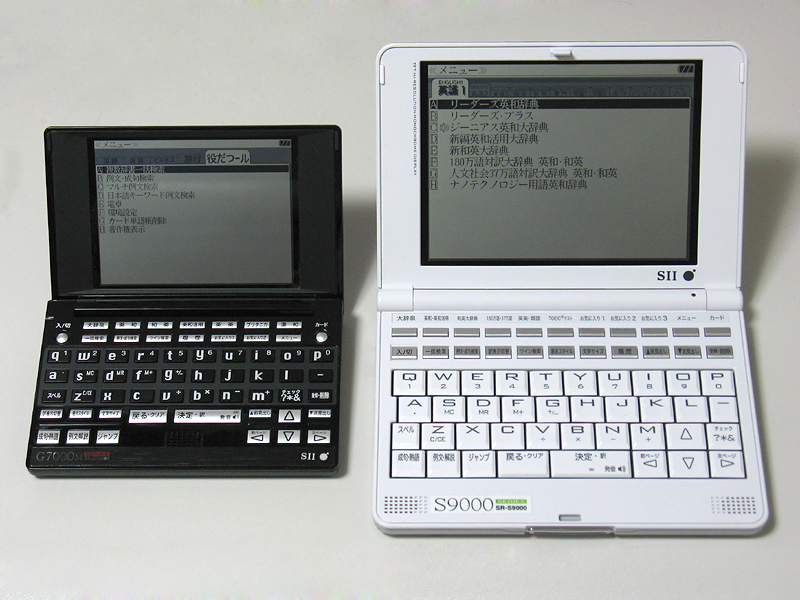
Rikaitan supports dictionaries in the esoteric but popular EPWING format. They were often utilized in portable electronic dictionaries similar to the ones pictured below. These dictionaries are often sought after by language learners for their correctness and excellent coverage of the Japanese language.
Unfortunately, as most of the dictionaries released in this format are proprietary, you will need to procure these dictionaries yourself and import them using Rikaitan Import. Check the project page for additional details.
Bulk Importing Dictionaries
Rikaitan also supports exporting and importing your entire collection of dictionaries.
Importing a Dictionary Collection
- Go to Rikaitan’s settings page (click on the extension’s icon then click on the cog icon from the popup)
- Click
Import Dictionary Collectionand select the database file you want to import - Wait for the import to finish then turn all the dictionaries back on from the
Dictionaries > Configure installed and enabled dictionariessection - Refresh the browser tab to see the dictionaries in effect
Exporting the Dictionary Collection
- Click
Export Dictionary Collectionfrom the backup section of Rikaitan’s settings page - It will show you a progress report as it exports the data then initiates a
download for a file named something like
rikaitan-dictionaries-YYYY-MM-DD-HH-mm-ss.json(e.g.rikaitan-dictionaries-2023-07-05-02-42-04.json)
Importing and Exporting Personal Configuration
Note that you can also similarly export and import your Rikaitan settings from
the Backup section of the Settings page.
You should be able to replicate your exact Rikaitan setup across devices by exporting your settings and dictionary collection from the source device then importing those from the destination.